# Roku App
Install Emby on Roku and connect using the Blackbeard’s Vault Host and Port settings.
# Roku App Sign-In
Connect Emby on a Roku streaming player or Roku TV.
## Before you start
- Have the **username and password supplied after signing up on Discord**. Use your username, not your email.
- Connect your device to the internet.
## Install and sign in
1. Search Roku’s **Streaming Store** for **Emby** and add it. The [official Roku page](https://emby.media/emby-for-roku.html) links to the correct app.
2. Open Emby and choose the manual server connection option if Emby Connect is offered.
3. Enter **Host**: `https://blackbeardsvault.com`.
4. Enter **Port**: `0`, then choose **Connect to Server**. On this Roku form, 0 prevents an extra port being appended to the HTTPS address.
5. Choose **Manual Login**. Enter your Discord-issued **Username** and **Password**, then sign in.
**Expected result:** your Emby home screen appears. Roku full playback is free; no playback app unlock is required.
[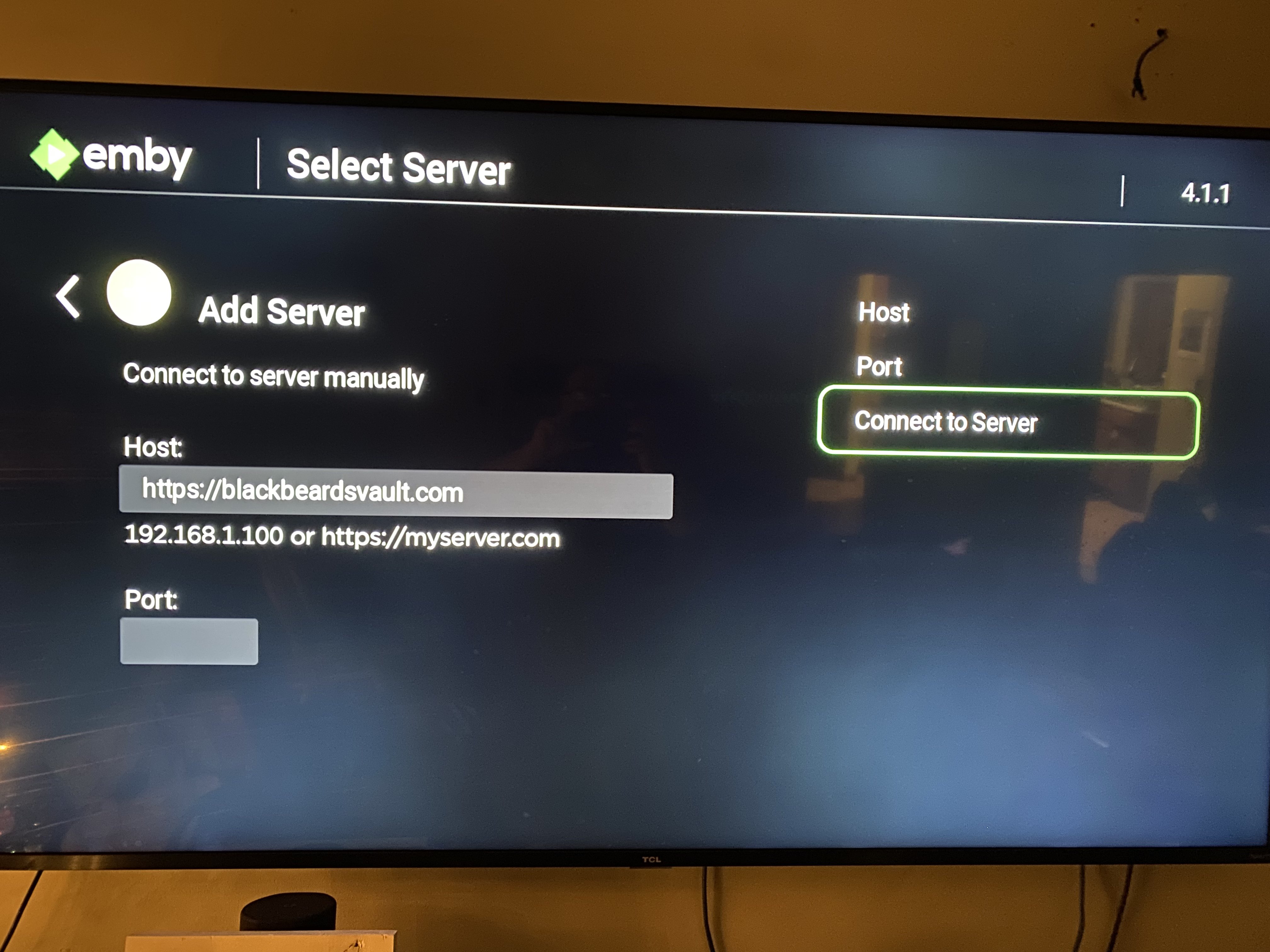](https://guides.blackbeardsvault.com/uploads/images/gallery/2024-01/rokuemby3.jpg)
Roku connection form from the existing guide. Use the Host and Port values written above.
**Already bought an app unlock in the past?** Emby honors those previous purchases. Sign in to the same Apple, Google, or Amazon store account that originally bought the unlock, using the matching app/platform. Use **Restore Purchase** if the app offers it. If the purchase is not recognized, contact Cruv. New app unlocks are no longer the route for access. **Never purchase Emby Premiere.**
**Need an unlock, or seeing “Premiere Device Limit Exceeded”?** Contact **@Captain Cruv** in **\#emby-support** for a **Jellyfin account**. **Do not buy an app unlock or Emby Premiere.** Once Cruv has provided your account, follow [Getting Started with Jellyfin](https://guides.blackbeardsvault.com/books/jellyfin-guides/page/getting-started-with-jellyfin).
## Troubleshooting
- **Cannot reach the server:** copy `https://blackbeardsvault.com` exactly and try [the web client](https://guides.blackbeardsvault.com/books/emby-app-setup-guides/page/web-client-sign-in).
- **Sign-in rejected:** check your username and password for extra spaces. Use the server login, not Emby Connect. Ask for account help if it still fails.
- **Playback or licensing error:** update the app, try another title, and report the exact message to support.
Contact **@Captain Cruv** in **\#emby-support** on Discord. Include your device, app version, exact error, and when it happened. Never post your password.
## References
[Emby playback requirements](https://emby.media/support/articles/Premiere-Feature-Matrix.html) · [Emby Roku developer guidance on Port 0](https://emby.media/community/topic/103809-roku-tv-emby-app-unable-to-connect-remotely/)
Technical guidance reviewed September 2026. Store availability and interface labels can change.