# Emby App Setup Guides
Download links, sign in instructions, and getting started guides can all be found here.
# 🚀 Getting Started with Emby
Set up Emby for streaming from Blackbeard’s Vault. Start with your account, then choose the guide for your device.
Before you start
- Have the Emby username and password supplied on Discord. Contact Cruv if you need an account or cannot find your details.
- Use your supplied server username, not your email address. Follow the direct server sign-in steps in your device’s guide.
- Install the player app for your device. You do not need to install Emby Server.
Your streaming server
https://blackbeardsvault.com
Use the complete HTTPS address. Follow your device’s guide for the server fields and port: Roku’s setup differs from other Emby apps.
Choose your device
Need the app first? See Where to Download for official app links. Availability depends on the device model, software version, and region.
Expected result: your libraries appear after sign-in. Play a short part of a title to check picture and sound.
App unlock or Premiere message
Previously purchased an app unlock? Those purchases remain grandfathered. Sign into the same app-store account used for the original purchase, using the matching app and platform. Use Restore Purchase if offered. Your app-store account is separate from your Emby server login.
New app unlocks are no longer available. If you need an unlock, the purchase is not recognized, or playback remains blocked by a licensing or device-limit message, contact @Captain Cruv in #emby-support for a Jellyfin account.
Under no circumstances should you purchase Emby Premiere.
Once Cruv supplies your Jellyfin account, follow Getting Started with Jellyfin.
After signing in
Use Home Screen Customization to arrange your libraries and home sections.
Downloads for offline viewing
The old separate downloader is deprecated. Downloads are provided through Jellyfin upon request and approval by Cruv. Contact Cruv on Discord to request download access and wait for approval.
Need help?
Contact @Captain Cruv in #emby-support on Discord. Include your device model, app version, the exact error, and when it happened. Never post your password.
| Device | Official app | Setup |
|---|
| Amazon Fire TV | [Download / store link](https://emby.media/emby-for-fire-tv.html) | [Sign-in guide](https://guides.blackbeardsvault.com/books/emby-app-setup-guides/page/amazon-fire-tv-sign-in-and-app-unlock) |
| Android phone / tablet | [Download / store link](https://emby.media/emby-for-android.html) | [Sign-in guide](https://guides.blackbeardsvault.com/books/emby-app-setup-guides/page/android-app-sign-in-and-unlock) |
| Android TV / Google TV | [Download / store link](https://emby.media/emby-for-android-tv.html) | [Sign-in guide](https://guides.blackbeardsvault.com/books/emby-app-setup-guides/page/android-app-sign-in-and-unlock) |
| NVIDIA Shield | [Download / store link](https://emby.media/emby-for-nvidiashield.html) | [Sign-in guide](https://guides.blackbeardsvault.com/books/emby-app-setup-guides/page/android-app-sign-in-and-unlock) |
| Apple TV | [Download / store link](https://emby.media/emby-for-appletv.html) | [Sign-in guide](https://guides.blackbeardsvault.com/books/emby-app-setup-guides/page/ios-app-sign-in-and-unlock) |
| iPhone / iPad | [Download / store link](https://emby.media/emby-for-ios.html) | [Sign-in guide](https://guides.blackbeardsvault.com/books/emby-app-setup-guides/page/ios-app-sign-in-and-unlock) |
| LG webOS | [Download / store link](https://emby.media/emby-for-lg-smart-tv.html) | [Sign-in guide](https://guides.blackbeardsvault.com/books/emby-app-setup-guides/page/smart-tv-app-sign-in-and-app-unlock) |
| Samsung Tizen | [Download / store link](https://emby.media/emby-for-samsung-smart-tv.html) | [Sign-in guide](https://guides.blackbeardsvault.com/books/emby-app-setup-guides/page/smart-tv-app-sign-in-and-app-unlock) |
| Roku / Roku TV | [Download / store link](https://emby.media/emby-for-roku.html) | [Sign-in guide](https://guides.blackbeardsvault.com/books/emby-app-setup-guides/page/roku-app-sign-in) |
- Have the **username and password supplied after signing up on Discord**. Use your username, not your email.
- Connect your device to the internet.
## Sign in
1. Open [https://blackbeardsvault.com](https://blackbeardsvault.com).
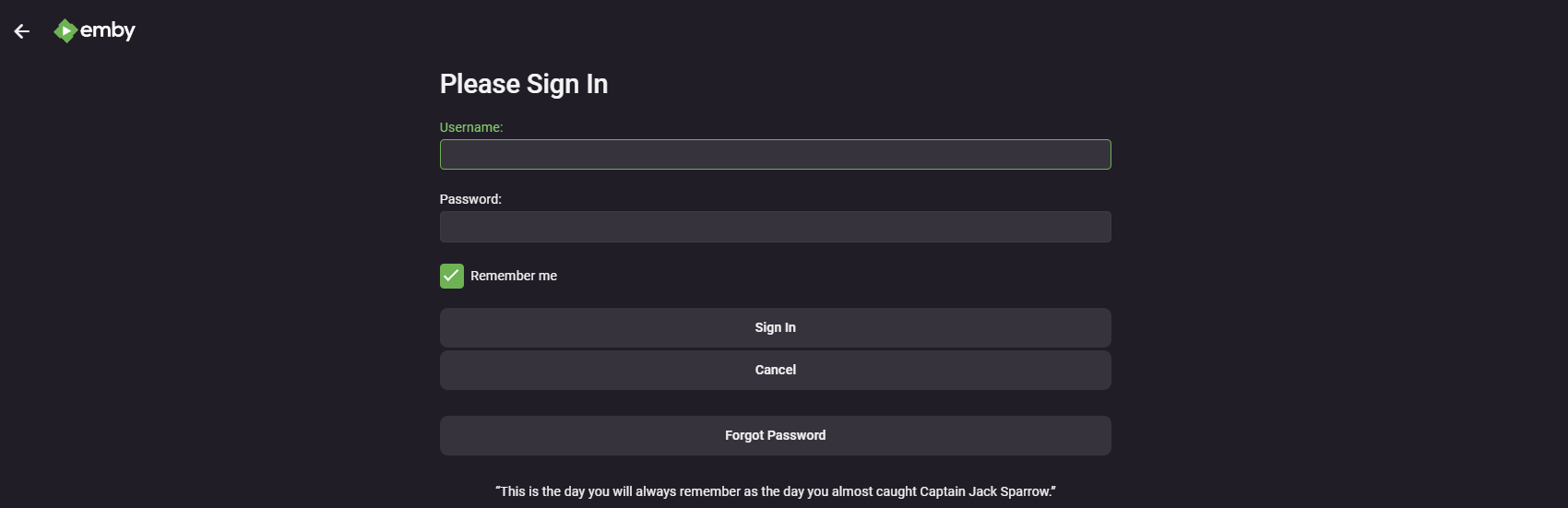
2. If a profile list appears, choose **Manual Login**. Enter your Discord-issued **Username** and **Password**.
3. Use **Remember me** only on your own device, then select **Sign In**.
**Expected result:** your Emby home screen shows the libraries available to your account.
[](https://guides.blackbeardsvault.com/uploads/images/gallery/2024-01/image.png)
Sign-in screen from the existing guide; appearance may vary by version.
## Next steps
Bookmark the site with **Ctrl+D** on Windows or **Command+D** on Mac. Follow [Home Screen Customization](https://guides.blackbeardsvault.com/books/emby-app-setup-guides/page/home-screen-customization) to arrange your home page.
## Troubleshooting
**Already bought an app unlock in the past?** Emby honors those previous purchases. Sign in to the same Apple, Google, or Amazon store account that originally bought the unlock, using the matching app/platform. Use **Restore Purchase** if the app offers it. If the purchase is not recognized, contact Cruv. New app unlocks are no longer the route for access. **Never purchase Emby Premiere.**
**Need an unlock, or seeing “Premiere Device Limit Exceeded”?** Contact **@Captain Cruv** in **\#emby-support** for a **Jellyfin account**. **Do not buy an app unlock or Emby Premiere.** Once Cruv has provided your account, follow [Getting Started with Jellyfin](https://guides.blackbeardsvault.com/books/jellyfin-guides/page/getting-started-with-jellyfin).
- **Cannot reach the server:** copy `https://blackbeardsvault.com` exactly and try [the web client](https://guides.blackbeardsvault.com/books/emby-app-setup-guides/page/web-client-sign-in).
- **Sign-in rejected:** check your username and password for extra spaces. Use the server login, not Emby Connect. Ask for account help if it still fails.
- **Playback or licensing error:** update the app, try another title, and report the exact message to support.
Contact **@Captain Cruv** in **\#emby-support** on Discord. Include your device, app version, exact error, and when it happened. Never post your password.
## References
[Emby web client](https://support.emby.media/support/articles/Web-Client.html) · [Server accounts and Emby Connect](https://support.emby.media/support/articles/Emby-Connect.html)
Technical guidance reviewed September 2026. Store availability and interface labels can change.
# Home Screen Customization
Arrange your Emby web home screen so the items you use most are easy to find. These are personal display preferences.
## Before you start
Sign in at [https://blackbeardsvault.com](https://blackbeardsvault.com). This guide uses the web client; app versions can have different section controls.
## Customize the home screen
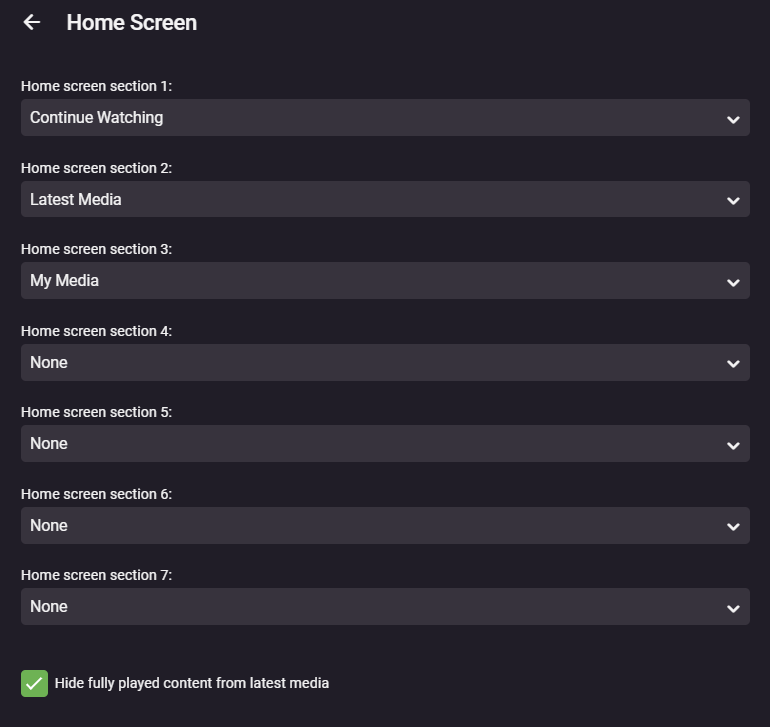
1. Open your **profile menu** at the top right, then choose **App Settings**. Some versions show a gear icon.
2. Choose **Home Screen**.
3. Arrange the home sections in this order where those controls are available: **Continue Watching**, **Latest Media**, then **My Media**. Set unused sections to **None** if your version uses numbered section menus.
4. Enable **Hide fully played content from latest media** if you prefer to see only unwatched additions. Use **Library Order** to put your most-used libraries first.
5. Save if the screen provides a save button, then return to Home and check the result.
**Expected result:** in-progress titles appear first, followed by new additions and your library shortcuts. Pick a different order if it suits you better.
[](https://guides.blackbeardsvault.com/uploads/images/gallery/2024-01/OoVimage.png)
Example from the existing guide. Newer Emby versions may use a different section editor; the suggested order is the same.
## Troubleshooting
If a label or option is missing, check the equivalent Home Screen controls in your current app. Available sections depend on the libraries your account can access. Refresh Home after changing settings; some preferences are specific to the client.
Contact **@Captain Cruv** in **\#emby-support** on Discord. Include your device, app version, exact error, and when it happened. Never post your password.
## References
[Emby Home Screen and Library Order](https://emby.media/community/topic/129635-how-to-rearrange-libraries/) · [Emby web client](https://support.emby.media/support/articles/Web-Client.html)
Technical guidance reviewed September 2026. Store availability and interface labels can change.
# iOS Apps
Set up Emby on iPhone, iPad, and Apple TV, with separate playback-access guidance.
# iOS App Sign-In and unlock
Set up Emby on an iPhone, iPad, or Apple TV.
## Before you start
- Have the **username and password supplied after signing up on Discord**. Use your username, not your email.
- Connect your device to the internet.
## Install Emby
Install [Emby for iPhone and iPad](https://emby.media/emby-for-ios.html) from the App Store, or [Emby for Apple TV](https://emby.media/emby-for-appletv.html) from the tvOS App Store. Check compatibility on your device.
## Connect and sign in
1. Open Emby. If it offers **Emby Connect**, choose **Skip** or the option to connect manually. Menu wording varies by app version.
2. Choose **Add Server** if needed. In **Host** or the server-address field, enter `https://blackbeardsvault.com`. Keep `https://` and add no extra port or path.
3. If the app shows a separate **Port** field, leave it **blank**, then choose **Connect** or **Connect to Server**.
4. Choose **Manual Login** if offered. Enter the **Username** and **Password** supplied on Discord, then select **Sign In**.
**Expected result:** the home screen shows your available libraries. Play a short part of a title to check the setup.
Emby Connect is optional and uses a separately linked Connect account. Your supplied server username and password belong on the server sign-in screen.
## Playback access
Apple TV has free full playback. iPhone/iPad playback can depend on server Premiere; if it is blocked, contact Cruv for Jellyfin.
**Already bought an app unlock in the past?** Emby honors those previous purchases. Sign in to the same Apple, Google, or Amazon store account that originally bought the unlock, using the matching app/platform. Use **Restore Purchase** if the app offers it. If the purchase is not recognized, contact Cruv. New app unlocks are no longer the route for access. **Never purchase Emby Premiere.**
**Need an unlock, or seeing “Premiere Device Limit Exceeded”?** Contact **@Captain Cruv** in **\#emby-support** for a **Jellyfin account**. **Do not buy an app unlock or Emby Premiere.** Once Cruv has provided your account, follow [Getting Started with Jellyfin](https://guides.blackbeardsvault.com/books/jellyfin-guides/page/getting-started-with-jellyfin).
## Troubleshooting
- **Cannot reach the server:** copy `https://blackbeardsvault.com` exactly and try [the web client](https://guides.blackbeardsvault.com/books/emby-app-setup-guides/page/web-client-sign-in).
- **Sign-in rejected:** check your username and password for extra spaces. Use the server login, not Emby Connect. Ask for account help if it still fails.
- **Playback or licensing error:** update the app, try another title, and report the exact message to support.
Contact **@Captain Cruv** in **\#emby-support** on Discord. Include your device, app version, exact error, and when it happened. Never post your password.
## References
[Emby playback and Premiere requirements](https://emby.media/support/articles/Premiere-Feature-Matrix.html) · [Emby Connect explained](https://support.emby.media/support/articles/Emby-Connect.html)
Technical guidance reviewed September 2026. Store availability and interface labels can change.
# Roku App
Install Emby on Roku and connect using the Blackbeard’s Vault Host and Port settings.
# Roku App Sign-In
Connect Emby on a Roku streaming player or Roku TV.
## Before you start
- Have the **username and password supplied after signing up on Discord**. Use your username, not your email.
- Connect your device to the internet.
## Install and sign in
1. Search Roku’s **Streaming Store** for **Emby** and add it. The [official Roku page](https://emby.media/emby-for-roku.html) links to the correct app.
2. Open Emby and choose the manual server connection option if Emby Connect is offered.
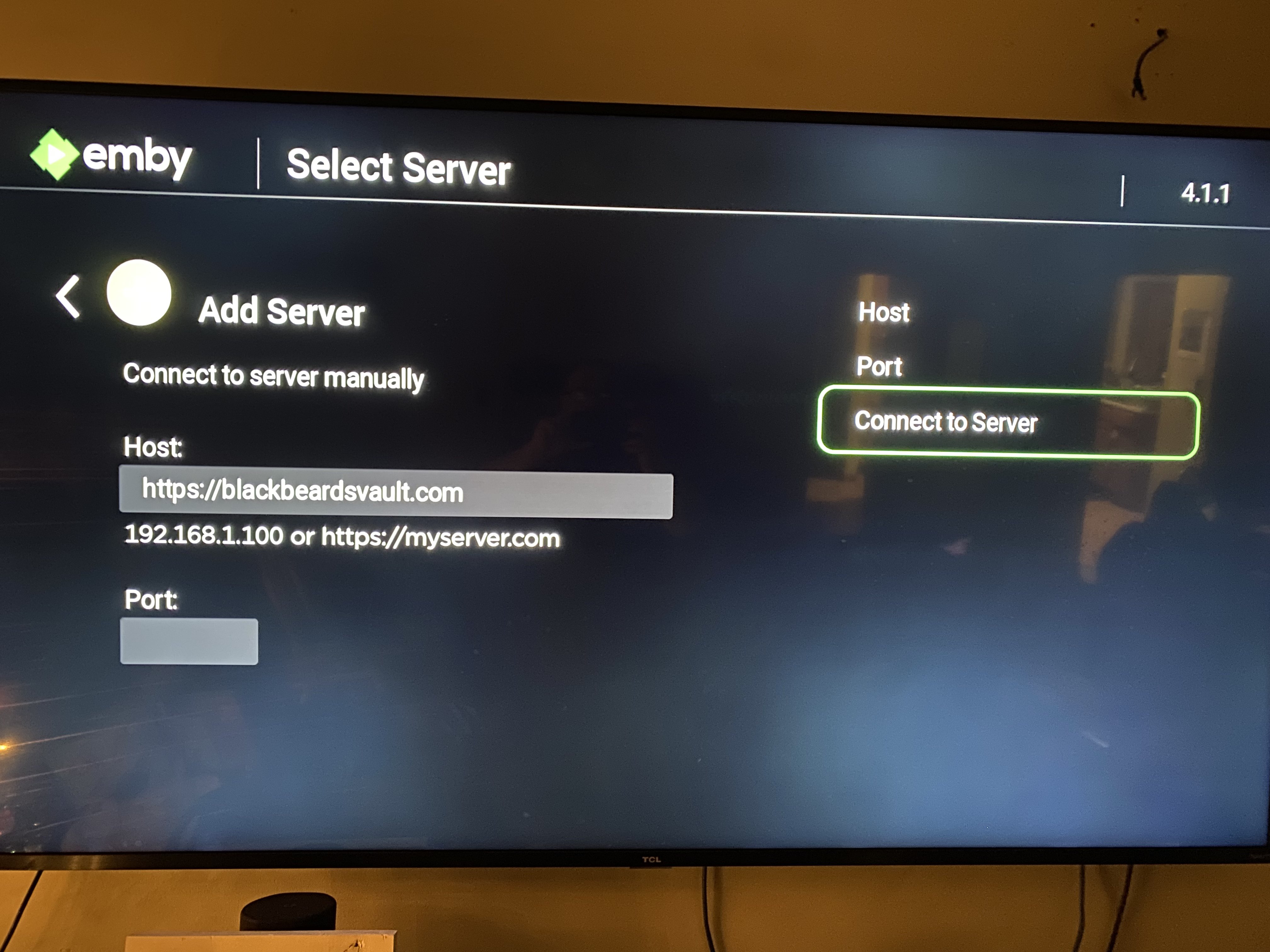
3. Enter **Host**: `https://blackbeardsvault.com`.
4. Enter **Port**: `0`, then choose **Connect to Server**. On this Roku form, 0 prevents an extra port being appended to the HTTPS address.
5. Choose **Manual Login**. Enter your Discord-issued **Username** and **Password**, then sign in.
**Expected result:** your Emby home screen appears. Roku full playback is free; no playback app unlock is required.
[](https://guides.blackbeardsvault.com/uploads/images/gallery/2024-01/rokuemby3.jpg)
Roku connection form from the existing guide. Use the Host and Port values written above.
**Already bought an app unlock in the past?** Emby honors those previous purchases. Sign in to the same Apple, Google, or Amazon store account that originally bought the unlock, using the matching app/platform. Use **Restore Purchase** if the app offers it. If the purchase is not recognized, contact Cruv. New app unlocks are no longer the route for access. **Never purchase Emby Premiere.**
**Need an unlock, or seeing “Premiere Device Limit Exceeded”?** Contact **@Captain Cruv** in **\#emby-support** for a **Jellyfin account**. **Do not buy an app unlock or Emby Premiere.** Once Cruv has provided your account, follow [Getting Started with Jellyfin](https://guides.blackbeardsvault.com/books/jellyfin-guides/page/getting-started-with-jellyfin).
## Troubleshooting
- **Cannot reach the server:** copy `https://blackbeardsvault.com` exactly and try [the web client](https://guides.blackbeardsvault.com/books/emby-app-setup-guides/page/web-client-sign-in).
- **Sign-in rejected:** check your username and password for extra spaces. Use the server login, not Emby Connect. Ask for account help if it still fails.
- **Playback or licensing error:** update the app, try another title, and report the exact message to support.
Contact **@Captain Cruv** in **\#emby-support** on Discord. Include your device, app version, exact error, and when it happened. Never post your password.
## References
[Emby playback requirements](https://emby.media/support/articles/Premiere-Feature-Matrix.html) · [Emby Roku developer guidance on Port 0](https://emby.media/community/topic/103809-roku-tv-emby-app-unable-to-connect-remotely/)
Technical guidance reviewed September 2026. Store availability and interface labels can change.
# Amazon Fire TV
Install Emby on compatible Fire TV devices and resolve sign-in or playback-access issues.
# Amazon Fire TV sign in and app unlock
Set up Emby on a compatible Amazon Fire TV or Fire TV Stick.
## Before you start
- Have the **username and password supplied after signing up on Discord**. Use your username, not your email.
- Connect your device to the internet.
## Install Emby
Search the Amazon Appstore on your device for **Emby** and install it. Use [Emby’s Fire TV page](https://emby.media/emby-for-fire-tv.html) for the official listing. If it is unavailable, check the exact device model with support.
## Connect and sign in
1. Open Emby. If it offers **Emby Connect**, choose **Skip** or the option to connect manually. Menu wording varies by app version.
2. Choose **Add Server** if needed. In **Host** or the server-address field, enter `https://blackbeardsvault.com`. Keep `https://` and add no extra port or path.
3. If the app shows a separate **Port** field, leave it **blank**, then choose **Connect** or **Connect to Server**.
4. Choose **Manual Login** if offered. Enter the **Username** and **Password** supplied on Discord, then select **Sign In**.
**Expected result:** the home screen shows your available libraries. Play a short part of a title to check the setup.
Emby Connect is optional and uses a separately linked Connect account. Your supplied server username and password belong on the server sign-in screen.
## Playback access
TV playback rules differ by platform. LG, Samsung, Roku, and Apple TV have free full playback in Emby’s current feature matrix. Android TV / Google TV and Fire TV have a server-wide free-device allowance; a license-limit message is not proof that a trial expired.
**Already bought an app unlock in the past?** Emby honors those previous purchases. Sign in to the same Apple, Google, or Amazon store account that originally bought the unlock, using the matching app/platform. Use **Restore Purchase** if the app offers it. If the purchase is not recognized, contact Cruv. New app unlocks are no longer the route for access. **Never purchase Emby Premiere.**
**Need an unlock, or seeing “Premiere Device Limit Exceeded”?** Contact **@Captain Cruv** in **\#emby-support** for a **Jellyfin account**. **Do not buy an app unlock or Emby Premiere.** Once Cruv has provided your account, follow [Getting Started with Jellyfin](https://guides.blackbeardsvault.com/books/jellyfin-guides/page/getting-started-with-jellyfin).
## Troubleshooting
- **Cannot reach the server:** copy `https://blackbeardsvault.com` exactly and try [the web client](https://guides.blackbeardsvault.com/books/emby-app-setup-guides/page/web-client-sign-in).
- **Sign-in rejected:** check your username and password for extra spaces. Use the server login, not Emby Connect. Ask for account help if it still fails.
- **Playback or licensing error:** update the app, try another title, and report the exact message to support.
Contact **@Captain Cruv** in **\#emby-support** on Discord. Include your device, app version, exact error, and when it happened. Never post your password.
## References
[Emby playback and Premiere requirements](https://emby.media/support/articles/Premiere-Feature-Matrix.html) · [Emby Connect explained](https://support.emby.media/support/articles/Emby-Connect.html)
Technical guidance reviewed September 2026. Store availability and interface labels can change.
# Android
Set up Emby on Android phones, tablets, Android TV, and Google TV.
# Android app sign in and unlock
Set up Emby on an Android phone, tablet, Android TV, or Google TV device.
## Before you start
- Have the **username and password supplied after signing up on Discord**. Use your username, not your email.
- Connect your device to the internet.
## Install Emby
Install Emby through the [official Android download page](https://emby.media/emby-for-android.html). For a television, choose the TV-compatible client listed by [Emby for Android TV](https://emby.media/emby-for-android-tv.html); NVIDIA Shield and Google TV belong to this group.
## Connect and sign in
1. Open Emby. If it offers **Emby Connect**, choose **Skip** or the option to connect manually. Menu wording varies by app version.
2. Choose **Add Server** if needed. In **Host** or the server-address field, enter `https://blackbeardsvault.com`. Keep `https://` and add no extra port or path.
3. If the app shows a separate **Port** field, leave it **blank**, then choose **Connect** or **Connect to Server**.
4. Choose **Manual Login** if offered. Enter the **Username** and **Password** supplied on Discord, then select **Sign In**.
**Expected result:** the home screen shows your available libraries. Play a short part of a title to check the setup.
Emby Connect is optional and uses a separately linked Connect account. Your supplied server username and password belong on the server sign-in screen.
## Playback access
Playback access can depend on your app and the server’s Premiere device allowance. If the app blocks playback or asks for payment, use the Jellyfin route below.
TV playback rules differ by platform. LG, Samsung, Roku, and Apple TV have free full playback in Emby’s current feature matrix. Android TV / Google TV and Fire TV have a server-wide free-device allowance; a license-limit message is not proof that a trial expired.
**Already bought an app unlock in the past?** Emby honors those previous purchases. Sign in to the same Apple, Google, or Amazon store account that originally bought the unlock, using the matching app/platform. Use **Restore Purchase** if the app offers it. If the purchase is not recognized, contact Cruv. New app unlocks are no longer the route for access. **Never purchase Emby Premiere.**
**Need an unlock, or seeing “Premiere Device Limit Exceeded”?** Contact **@Captain Cruv** in **\#emby-support** for a **Jellyfin account**. **Do not buy an app unlock or Emby Premiere.** Once Cruv has provided your account, follow [Getting Started with Jellyfin](https://guides.blackbeardsvault.com/books/jellyfin-guides/page/getting-started-with-jellyfin).
## Troubleshooting
- **Cannot reach the server:** copy `https://blackbeardsvault.com` exactly and try [the web client](https://guides.blackbeardsvault.com/books/emby-app-setup-guides/page/web-client-sign-in).
- **Sign-in rejected:** check your username and password for extra spaces. Use the server login, not Emby Connect. Ask for account help if it still fails.
- **Playback or licensing error:** update the app, try another title, and report the exact message to support.
Contact **@Captain Cruv** in **\#emby-support** on Discord. Include your device, app version, exact error, and when it happened. Never post your password.
## References
[Emby playback and Premiere requirements](https://emby.media/support/articles/Premiere-Feature-Matrix.html) · [Emby Connect explained](https://support.emby.media/support/articles/Emby-Connect.html)
Technical guidance reviewed September 2026. Store availability and interface labels can change.
# Smart TV Apps
Set up Emby on LG webOS, Samsung Tizen, Android TV, and Google TV. Includes sign-in steps and help with playback access.
# Smart TV App sign in and app unlock
Connect an LG, Samsung, Android TV, or Google TV television to Blackbeard’s Vault.
## Before you start
- Have the **username and password supplied after signing up on Discord**. Use your username, not your email.
- Connect your device to the internet.
## Install Emby
| TV system | Install the app |
|---|
| LG webOS | [Emby for LG](https://emby.media/emby-for-lg-smart-tv.html) through the TV’s app store. |
| Samsung Tizen | [Emby for Samsung](https://emby.media/emby-for-samsung-smart-tv.html) through Samsung Apps where available. |
| Android TV / Google TV | [Emby for Android TV](https://emby.media/emby-for-android-tv.html) through Google Play. |
1. Open Emby. If it offers **Emby Connect**, choose **Skip** or the option to connect manually. Menu wording varies by app version.
2. Choose **Add Server** if needed. In **Host** or the server-address field, enter `https://blackbeardsvault.com`. Keep `https://` and add no extra port or path.
3. If the app shows a separate **Port** field, leave it **blank**, then choose **Connect** or **Connect to Server**.
4. Choose **Manual Login** if offered. Enter the **Username** and **Password** supplied on Discord, then select **Sign In**.
**Expected result:** the home screen shows your available libraries. Play a short part of a title to check the setup.
Emby Connect is optional and uses a separately linked Connect account. Your supplied server username and password belong on the server sign-in screen.
## Playback access
TV playback rules differ by platform. LG, Samsung, Roku, and Apple TV have free full playback in Emby’s current feature matrix. Android TV / Google TV and Fire TV have a server-wide free-device allowance; a license-limit message is not proof that a trial expired.
**Already bought an app unlock in the past?** Emby honors those previous purchases. Sign in to the same Apple, Google, or Amazon store account that originally bought the unlock, using the matching app/platform. Use **Restore Purchase** if the app offers it. If the purchase is not recognized, contact Cruv. New app unlocks are no longer the route for access. **Never purchase Emby Premiere.**
**Need an unlock, or seeing “Premiere Device Limit Exceeded”?** Contact **@Captain Cruv** in **\#emby-support** for a **Jellyfin account**. **Do not buy an app unlock or Emby Premiere.** Once Cruv has provided your account, follow [Getting Started with Jellyfin](https://guides.blackbeardsvault.com/books/jellyfin-guides/page/getting-started-with-jellyfin).
## Troubleshooting
- **Cannot reach the server:** copy `https://blackbeardsvault.com` exactly and try [the web client](https://guides.blackbeardsvault.com/books/emby-app-setup-guides/page/web-client-sign-in).
- **Sign-in rejected:** check your username and password for extra spaces. Use the server login, not Emby Connect. Ask for account help if it still fails.
- **Playback or licensing error:** update the app, try another title, and report the exact message to support.
Contact **@Captain Cruv** in **\#emby-support** on Discord. Include your device, app version, exact error, and when it happened. Never post your password.
## References
[Emby playback and Premiere requirements](https://emby.media/support/articles/Premiere-Feature-Matrix.html) · [Emby Connect explained](https://support.emby.media/support/articles/Emby-Connect.html)
Technical guidance reviewed September 2026. Store availability and interface labels can change.
# Xbox and Playstation Apps
Check Emby support for Xbox and PlayStation, then choose an available playback option.
# Watching Emby from a console
Choose a supported way to watch Emby on an Xbox or PlayStation console. Availability and playback access depend on the console.
## Before you start
- Have the **username and password supplied after signing up on Discord**. Use your username, not your email.
- Connect your device to the internet.
## Xbox One and Xbox Series X/S
1. Install Emby from the Microsoft Store using [Emby’s Xbox page](https://emby.media/emby-for-xbox.html) to identify the official app.
2. Open the app and connect manually to `https://blackbeardsvault.com`. Use your Discord-issued server username and password.
3. Try a title. Native Xbox playback requires server Premiere; if access is blocked, contact Cruv for Jellyfin instead of purchasing anything.
## PlayStation
**PS4:** Emby documents a browser client, not a native PlayStation app. Open the PS4 **Internet Browser** at [https://tv.emby.media](https://tv.emby.media), connect to `https://blackbeardsvault.com`, and use your server credentials. Emby lists Premiere as required for this TV interface.
**PS5:** do not follow the PS4 browser instructions; PS5 has no dedicated web-browser app. Use a supported TV app, streaming device, phone, or computer instead.
## If playback is blocked
**Already bought an app unlock in the past?** Emby honors those previous purchases. Sign in to the same Apple, Google, or Amazon store account that originally bought the unlock, using the matching app/platform. Use **Restore Purchase** if the app offers it. If the purchase is not recognized, contact Cruv. New app unlocks are no longer the route for access. **Never purchase Emby Premiere.**
**Need an unlock, or seeing “Premiere Device Limit Exceeded”?** Contact **@Captain Cruv** in **\#emby-support** for a **Jellyfin account**. **Do not buy an app unlock or Emby Premiere.** Once Cruv has provided your account, follow [Getting Started with Jellyfin](https://guides.blackbeardsvault.com/books/jellyfin-guides/page/getting-started-with-jellyfin).
A Jellyfin account also needs a compatible client. See [Jellyfin apps by platform](https://guides.blackbeardsvault.com/books/jellyfin-guides/page/app-suggestions-by-platform-jellyfin) before choosing a device.
## Troubleshooting
- **Cannot reach the server:** copy `https://blackbeardsvault.com` exactly and try [the web client](https://guides.blackbeardsvault.com/books/emby-app-setup-guides/page/web-client-sign-in).
- **Sign-in rejected:** check your username and password for extra spaces. Use the server login, not Emby Connect. Ask for account help if it still fails.
- **Playback or licensing error:** update the app, try another title, and report the exact message to support.
Contact **@Captain Cruv** in **\#emby-support** on Discord. Include your device, app version, exact error, and when it happened. Never post your password.
## References
[Emby for Xbox](https://emby.media/emby-for-xbox.html) · [Emby for PS4](https://emby.media/emby-ps4.html) · [Sony PS5 FAQ](https://blog.playstation.com/2020/11/09/ps5-the-ultimate-faq/)
Technical guidance reviewed September 2026. Store availability and interface labels can change.