# Home Screen Customization
Arrange your Emby web home screen so the items you use most are easy to find. These are personal display preferences.
## Before you start
Sign in at [https://blackbeardsvault.com](https://blackbeardsvault.com). This guide uses the web client; app versions can have different section controls.
## Customize the home screen
1. Open your **profile menu** at the top right, then choose **App Settings**. Some versions show a gear icon.
2. Choose **Home Screen**.
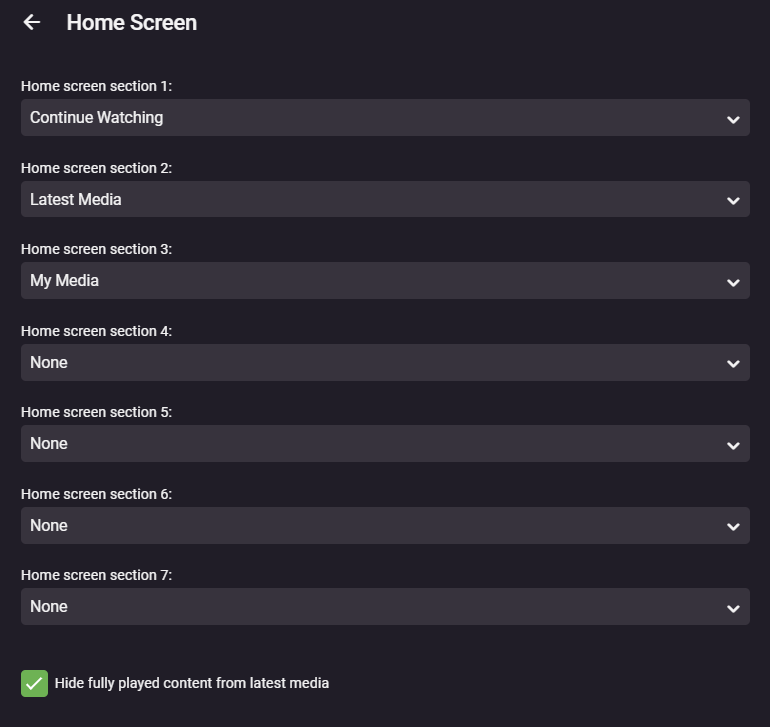
3. Arrange the home sections in this order where those controls are available: **Continue Watching**, **Latest Media**, then **My Media**. Set unused sections to **None** if your version uses numbered section menus.
4. Enable **Hide fully played content from latest media** if you prefer to see only unwatched additions. Use **Library Order** to put your most-used libraries first.
5. Save if the screen provides a save button, then return to Home and check the result.
**Expected result:** in-progress titles appear first, followed by new additions and your library shortcuts. Pick a different order if it suits you better.
[](https://guides.blackbeardsvault.com/uploads/images/gallery/2024-01/OoVimage.png)
Example from the existing guide. Newer Emby versions may use a different section editor; the suggested order is the same.
## Troubleshooting
If a label or option is missing, check the equivalent Home Screen controls in your current app. Available sections depend on the libraries your account can access. Refresh Home after changing settings; some preferences are specific to the client.
Contact **@Captain Cruv** in **\#emby-support** on Discord. Include your device, app version, exact error, and when it happened. Never post your password.
## References
[Emby Home Screen and Library Order](https://emby.media/community/topic/129635-how-to-rearrange-libraries/) · [Emby web client](https://support.emby.media/support/articles/Web-Client.html)
Technical guidance reviewed September 2026. Store availability and interface labels can change.