
Watching Emby from a console
UnfortunatelyChoose a supported way to watch Emby doeson an Xbox or PlayStation console. Availability and playback access depend on the console.
Before you start
Xbox One and Xbox Series X/S
https://blackbeardsvault.com. Use your Discord-issued server username and password.
Try a title. Native Xbox playback requires server Premiere; if access is blocked, contact Cruv for Jellyfin instead of purchasing anything.
PlayStation
PS4: Emby documents a browser client, not a native PlayStation app. Open the PS4 Internet Browser at https://tv.emby.media, connect to https://blackbeardsvault.com, and use your server credentials. Emby lists Premiere as required for this TV interface.
PS5: do not follow the PS4 browser instructions; PS5 has no dedicated web-browser app. Use a supported TV app, streaming device, phone, or computer instead.
If playback is blocked
Already bought an app unlock availablein the past? Emby honors those previous purchases. Sign in to the same Apple, Google, or Amazon store account that originally bought the unlock, using the matching app/platform. Use Restore Purchase if the app offers it. If the purchase is not recognized, contact Cruv. New app unlocks are no longer the route for consolesaccess. atNever this time.
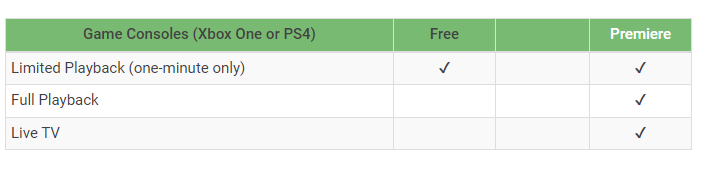
What this means is that your console will not be able to watch Emby from the native app
Do NOT purchase Emby Premiere.
EmbyNeed an unlock, or seeing “Premiere keysDevice areLimit installedExceeded”? onContact servers,@Captain Cruv in #emby-support for a Jellyfin account. Do not devices. Emby only allows me to purchase a certain number of keys from them. They cannot be assigned or allocated, they are checked out first come first served and only last a week at a time. Even at their highest tier there are not enough keys to allow everyone's devices to escape the need forbuy an app unlock.unlock or Emby Premiere. Once Cruv has provided your account, follow Getting Started with Jellyfin.
FortunatelyA mostJellyfin consolesaccount comealso withneeds a webcompatible browserclient. See Jellyfin apps by platform before choosing a device.
Troubleshooting
https://blackbeardsvault.com exactly and Contact @Captain Cruv in #emby-support on Discord. Include your device, app version, exact error, and when it happened. Never post your password.
References
Emby fromfor theXbox website instead. To do so please see this guide to get started:· https://guides.blackbeardsvault.com/books/app-setup-guides/page/web-client-sign-inEmby for PS4 · Sony PS5 FAQ
Technical guidance reviewed September 2026. Store availability and interface labels can change.